Skip to content
Solutions
Transportation Management
Optimize routes, manage shipments, track deliveries.
Warehouse Management
Coordinate inbound, internal, and outbound handling.
Inventory & Fulfillment
Track inventory, automate orders, sync channels.
Industries
Retail
Connect sales, delivery, and inventory in one system.
Third Party Logistics
Simplify fulfillment, billing, and tracking for every client.
Last Mile Delivery
Automate scheduling, optimize routes, track deliveries.
Insights
ROI Calculator
See the real impact of smarter logistics software.
Modules
Your complete logistics software control tower.
Blog
Latest on logistics trends and technology.
Case Studies
Real-world results from teams using Grasshopper Labs.
Help Center
Answers, guides, and support.
Plans
Talk to an Expert
Solutions
Transportation Management
Warehouse Management
Inventory & Fulfillment
Industries
Retail
Third Party Logistics
Last Mile Delivery
Insights
ROI Calculator
Modules
Blog
Case Studies
Help Center
Plans
Speak to an Expert
Help Center Menu
Getting Started
Orders
- Booking Orders
- Order Actions
- Orders View
Home Delivery
- Planning
- Routing
- Final Mile Delivery
Freight
- Manifest
- Transportation
Dispatch
- Operations
- Reports
Financials & Invoicing
- Billing
- Invoicing
- P&L
Reports
WMS
Claims
Mobile Apps
- Warehouse
- Driver
Glossary
Settings
- Shippers
- Users
- Vendors
- Carriers
- Regions
- Partners
- Pricing, Accessorials & Calculator
- Notifications
API
Release Notes
Help Center
Search articles, glossary, release notes...
⌘K
Get started
Release notes
API
Submit a Ticket
Getting Started
Orders
Home Delivery
Freight
Orders
Dispatch
Financials & Invoicing
Reports
WMS/Warehouse
Claims
Mobile Apps
Glossary
Settings
API
Release Notes
Submit a ticket →
Settings
Set Fuel Surcharge Rate Globally
Configure system-wide fuel surcharge rates for all orders.
5 Min Read
Updated August 10, 2025
Roles: Settings
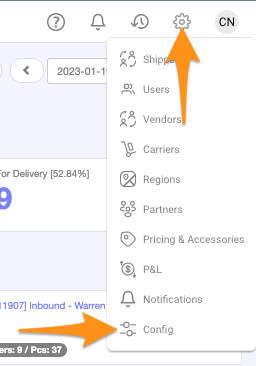
Step 1
Click the gear icon and select
Config
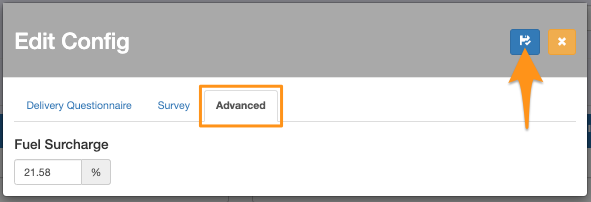
Step 2
On
Advanced
tab, enter the
Fuel Surcharge %
then
Save
Step 3
Apply Fuel Surcharge to Orders
Was this article helpful?
👍 Yes
👎 No
Still stuck?
Submit a ticket
. and someone on the team will get back to you.
On This Page
Step 1
Step 2
Step 3