
Release Notes
Version 3.26.06.10
Feature Enhancements
Web App — Advanced Settings
Advanced Settings Deep Linking
Links that point users to a specific Advanced Settings control can now open directly to the right tab and section instead of the general Advanced Settings page.
Key Enhancements:
• Advanced Settings supports deep-linking to a specific tab and section via URL, scrolling the target section into view on load.
• First applied to the Shipper Details page: the “Set at Advanced Settings” link for “Require Product Category on Order Entry” now opens directly to that setting.
Web App — Manifest & Route Planner
Manifest ID Search Field Added When Assigning Orders
Adding an order to an Outbound or Returns manifest previously required setting the Region and Date filters to locate it. A Manifest ID search field now lets users jump straight to a known manifest.
Key Enhancements:
• New Manifest ID search bar in the manifest selection section of Order Actions.
• Entering a Manifest ID locates and populates the matching manifest immediately, without adjusting Region or Date filters.
Pricing
Pricing V2 Now Defaults to Actual Order Distance
Pricing V2 now uses the order’s actual distance from hub for rate calculations when available, falling back to zip-code-to-zip-code distance only when it isn’t — including per-leg distance for multi-leg pricing.
Key Enhancements:
Rate calculations default to the order’s actual distance from hub instead of zip-to-zip distance when available.
• Multi-leg pricing requests include each leg’s own distance for its calculation.
Warehouse & Inventory
Inventory Import Validations for Cube, SKU, Dimensions, and Weight Inventory item import now validates cube, SKU, dimensions, and weight up front, catching bad data before it reaches operational flows.
Key Enhancements:
Cube validation on import now accepts the same low values allowed via inline edit (previously rejected valid low-cube items such as cloth or sofa components).
• Invalid values are flagged with a clear “Invalid value” message, consistent with existing vendor validation.
• The same validation applies on import and on the Inventory Item Create/Edit UI.
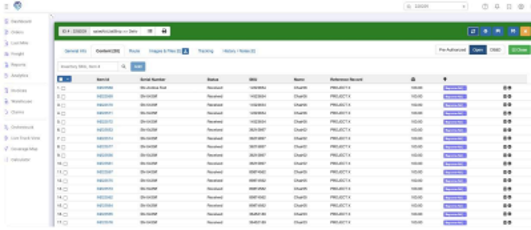
New Columns on Inbound Inventory Manifest Items Page
The Inbound Inventory Manifest Items page now surfaces two additional identifying columns.
Key Enhancements:
• Added a Serial Number column next to Item ID.
• Added a Reference Record column next to Name.
Invoicing
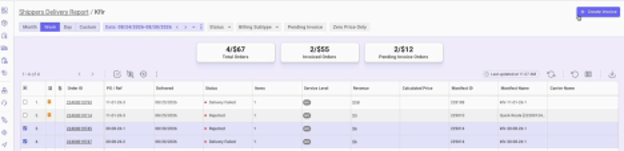
Generic “Create Invoice” Action for Non-QuickBooks Accounts
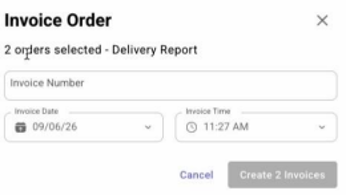
Creating an invoice was previously QuickBooks-only, leaving accounts on a third-party accounting system with no way to trigger the invoice event that downstream EDI integrations rely on. A generic Create Invoice action is now available for any account.
Key Enhancements:
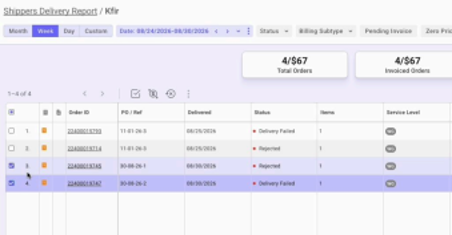
• New “Create Invoice” button, available from Order Details and the Delivery Report grid, for accounts with QuickBooks disabled.
• A dedicated dialog captures Invoice ID and issue date and fires the same order-invoice event that EDI integrations subscribe to. • Accounts with QuickBooks enabled see no change to the existing QuickBooks invoice flow.
API
Dedicated Delete API for Pending-Arrival Inventory Items
Deleting pending-arrival inventory items previously reused the general inventory update endpoint, which lacked ownership validation and could delete items in the wrong status. A dedicated endpoint replaces it.
Key Enhancements:
• New dedicated endpoint for deleting pending-arrival inventory items, in place of the overloaded update endpoint.
• Ownership is now validated, so a retailer can no longer delete items belonging to another retailer.
• Only items in the intended status are eligible for deletion, and multiple items are removed in a single operation.
Lasso Tracking
Enhanced Lasso Attempt Tracking
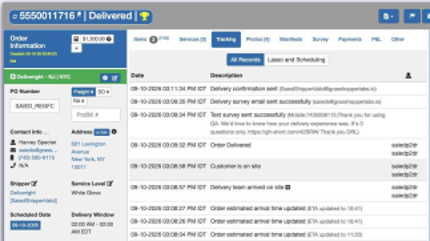
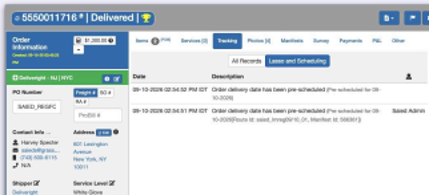
Lasso attempts that are skipped or fail now produce a tracking event with the reason, extending visibility well beyond the small subset of cases that previously generated a tracking record.
Key Enhancements:
• Tracking events now cover skipped or failed Lasso attempts across every trigger path — UI-initiated sends, the auto-Lasso plugin, and direct API calls — not just the handful of validations that previously produced an event.
• Each tracking entry records the specific reason a Lasso attempt was skipped or failed, so support and engineering no longer need to inspect server logs to diagnose why a Lasso wasn’t sent.
Reporting
Packaging Events Added to User Activity Report
Completing a packaging task in the Warehouse mobile app now generates an activity event, visible on the User Activity Report.
Key Enhancements:
• Marking a packaging task complete in the Warehouse mobile app now records a Packaging event.
• A Packaging column has been added to the User Activity Report (next to Inspections) and to its CSV export.
Defect Fixes
Warehouse & Inventory
Assign All No Longer Gets Stuck Fulfilling Pending Items From Inventory
Clicking Assign All when fulfilling pending items from inventory could leave the system in an assigning state for several minutes without completing, forcing users to assign items individually. This has been fixed, along with a false error message the initial fix had introduced.
Key Fixes:
• Assign All now completes within a reasonable time and updates order fulfillment status accordingly.
• Removed a false error snack bar that briefly appeared after inventory fulfillment as a side effect of this fix.
Inventory Deletion From SKU View Now Works
The “Delete Pending Arrival Items” action was shown in both the SKU View and Items View of the Unallocated Items screen, but always failed when run from the SKU View.
Key Fixes:
• Deleting pending arrival items from the SKU View now completes successfully.
Unallocated Items Category Filter No Longer Capped at 25 Results The Category filter in the Unallocated Items view showed only the first 25 categories, with no way to search or load the rest.
Key Fixes:
• The Category filter now includes all categories, with search and load-more support instead of a 25-item cap.
Cycle Count Hub Filter Now Syncs and Persists Across Tabs
The Hub filter on the Cycle Count module didn’t stick when switching between page tabs, and didn’t sync with the global hub selector the way it does in other Warehouse modules.
Key Fixes:
• The Cycle Count Hub filter now persists across tabs and stays in sync with the global hub selector.
Vendor Location Creation No Longer Duplicates the Vendor
Adding a new location to an existing vendor was creating a duplicate vendor entity instead of adding the location to the existing vendor.
Key Fixes:
• Adding a location now correctly appends it to the existing vendor’s locations instead of creating a new vendor.
Invoicing
Invoice Icon Behavior Fixed When QuickBooks Is Disabled
With QuickBooks integration disabled, the order invoice icon didn’t appear immediately after an invoice was created, and clicking an existing icon led to a dead-end QuickBooks error page.
Key Fixes:
• The invoice icon now appears immediately after invoice creation, without requiring a page refresh.
• The invoice icon is no longer clickable when QuickBooks is disabled; it now serves as a reference indicator only.
Integrations
Failed Deluxe Status and Photos From Partner Now Sync to VC
When a partner marked an item as Failed Deluxe from the Warehouse mobile app and attached photos, the status and photos updated on the partner’s side but did not sync to the Virtual Carrier account.
Key Fixes:
• Failed Deluxe status changes and photos initiated from the partner side now sync correctly to the VC account.
Notifications
Customer Confirmations Now Show the Correct Time Zone
Customer delivery-window confirmations were showing in the wrong time zone for a region configured for a different one, after delivery windows were broadcast.
Key Fixes:
• Customer confirmations now reflect the region’s configured time zone instead of defaulting incorrectly.
Scheduling
Return/Disposition Pickup Scheduling via Public Tracking Fixed Customers scheduling a pickup for a Return/Disposition order from the public tracking page could have the scheduling attempt fail, leaving the order unassigned to a manifest.
Key Fixes:
• Pickup scheduling from the public tracking page now correctly assigns the return/disposition order to the selected manifest.
• Wording on the scheduling flow now correctly refers to “Pickup” rather than “Delivery” for return orders.
Lasso Tracking
Lasso Skip Tracking Messages Corrected
Several tracking messages describing why a Lasso (customer scheduling communication) was skipped were showing the wrong status, missing entirely, or not reflecting shipper-level freeze settings.
Key Fixes:
• The “Lasso skipped” tracking message now shows the order status by name instead of its numeric code.
• A “Lasso skipped” tracking entry now appears when a manual Lasso fails because SMS, phone, or email is disabled in the shipper’s settings.
• Automatic Lasso is no longer sent for orders created via Global Sync when the shipper account is in a soft or hard freeze; a “Lasso skipped – shipper account is frozen” tracking entry is recorded instead.