
Release Notes
Version 3.26.06.10
Feature Enhancements
Web App — Order Management
Grid Actions Grouped by Category
The action menu on the Orders grid can now organize actions into labeled categories, making it easier to find the right action on grids that expose many options.
Key Enhancements:
- Item action menus can now group actions into labeled categories instead of one long list.
- Rolled out first on the Orders grid, which supports more than 10 actions.
Updated Scheduling Warning for Pending Return Orders
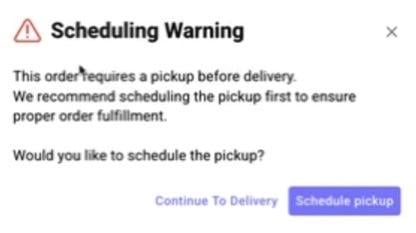
The warning shown when a delivery is scheduled before its required pickup has been rewritten for clarity, and now defaults to guiding users toward the correct workflow.
Key Enhancements:
- New warning copy: “This order requires a pickup before delivery. We recommend scheduling the pickup first to ensure proper order fulfillment.”
- “Schedule Pickup” is now the default, right-hand action; “Continue to Delivery” remains available as a secondary option.
- Applies to orders in Pending Return status; the underlying trigger logic is unchanged.
Web App — Manifest & Route Planner
Breadcrumb Navigation Added to Route Planner
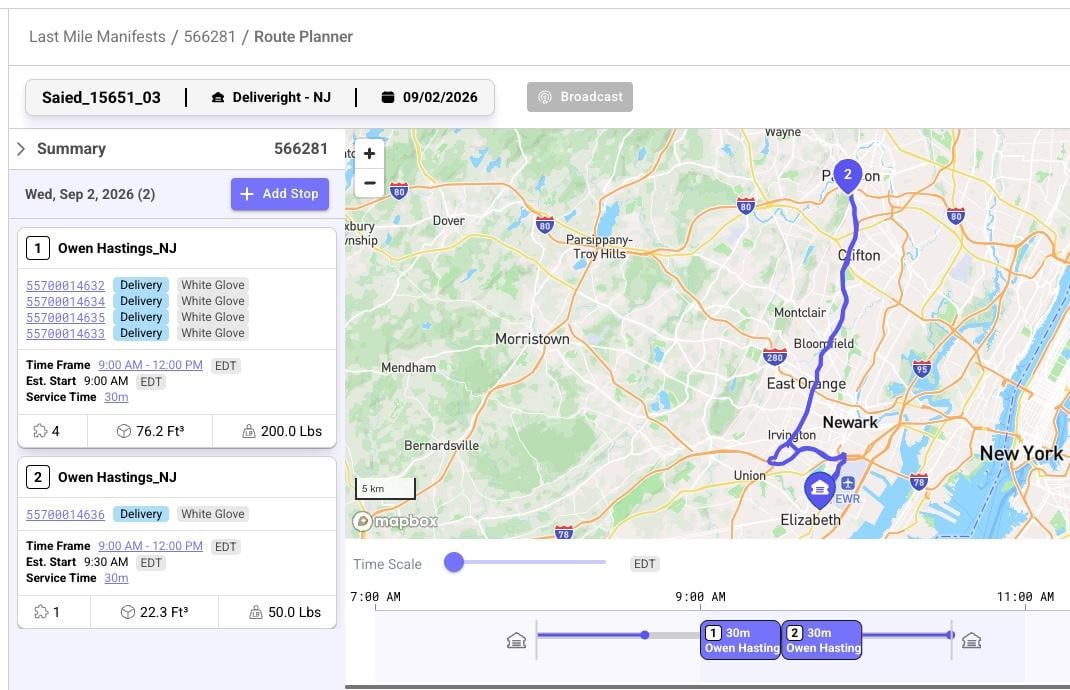
Users can now navigate directly back to the Last Mile screen they came from after opening Route Planner, instead of losing their date and filter selections.
Key Enhancements:
- A breadcrumb in the Route Planner header returns users to the exact Last Mile view they opened it from.
- Selected date, applied filters, and other context are preserved when navigating back.
Stop Numbers Added to Content Tab
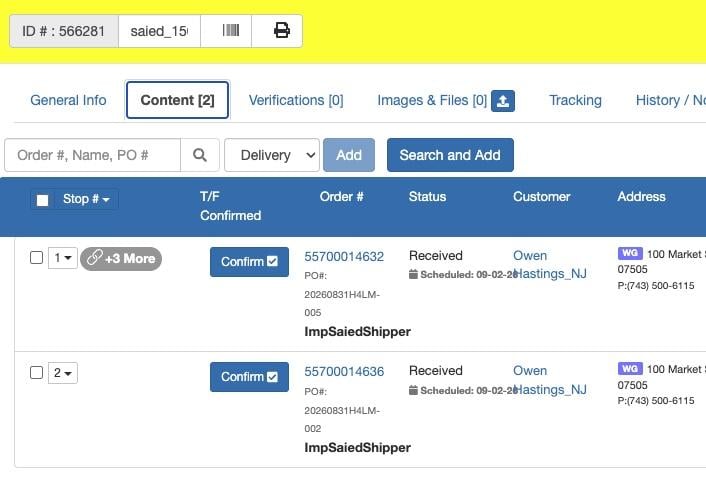
For manifests using the new Route Planner, the Content tab now displays each order’s stop number, matching the sequence shown on the Route tab.
Key Enhancements:
- A new, non-editable Stop Number column reflects the delivery sequence from the Route tab.
- The Content tab stays in sync with stop-order changes saved in Route Planner.
Warehouse & Inventory
Faster Tooltip on Auto Reservation Controls
The tooltip explaining disabled Auto Reservation controls in Shipper Inventory Policy now appears more quickly and responds to hovering anywhere on the control’s row.
Key Enhancements:
- Tooltip display time reduced to a half-second or less.
- Tooltip now triggers on hover over the full line (checkbox and label), not just the checkbox.
Reservation Matching Simplified — Vendor Check Removed
Reservation eligibility across manual, bulk, auto, and remote reservation now matches inventory by SKU and shipper only. The vendor match that previously caused available inventory to be rejected for reservation has been removed, bringing reservation in line with fulfillment.
Key Enhancements:
- Vendor is no longer considered when determining reservation eligibility, for last-mile and cross-dock inventory alike.
- Applies across every reservation entry point: single-order manual reservation, bulk reservation from the orders grid, auto-reserve, and remote reservation.
- Inventory that is fulfillable is now reliably reservable when stock is available, resolving cases where available inventory was previously rejected due to vendor data mismatches.
Defect Fixes
Web App
Side Navigation Icon Jitter Resolved
A visual glitch that caused side navigation icons to shift slightly when clicked has been fixed.
Key Fixes:
- Side navigation icons no longer jitter on click.
Pricing & Billing
Delivery Cost Recalculation Adjustment Errors Fixed
Recalculating delivery cost after an order edit (e.g. updating a line item’s weight or cube) could previously post multiple, incorrectly typed adjustment transactions and misstate revenue. This has been corrected to post a single, accurate adjustment.
Key Fixes:
- Delivery cost recalculation now posts one total-based adjustment transaction instead of multiple per-item/per-leg transactions.
- Adjustment transaction type and description are now accurate.
- Resolved cases where the payment revenue figure was understated or overstated after a recalculation.
Routing & Manifest
Routing Distance Calculation Error Resolved
An error occurring while calculating routing distance and duration for certain geo-coded locations has been fixed.
Key Fixes:
- Resolved the error affecting routing distance and duration calculation for affected geo-coded locations.
Driver Route Start No Longer Blocked by Closed Stops
Drivers were previously unable to start a route if any stop on the manifest had already been manually closed. Route-start validation now skips stops that are already in a terminal status (Delivered, Failed, or Cancelled), so drivers can start and complete their remaining stops without dispatcher intervention.
Key Fixes:
- Manually closed, delivered, failed, or cancelled stops no longer block route start.
- Validation is unchanged for stops that are genuinely not ready to go out.
Warehouse & Inventory
Manual Reservation Locking Fixed During Auto-Reserve Execution
The lock that temporarily blocks manual item reservation while the auto-reservation plugin runs has been rebuilt on a shared cache, so it now works correctly across all server instances rather than only a single instance.
Key Fixes:
- Manual reservation is now reliably blocked across all server instances while auto-reservation is executing, preventing reservation collisions.
API
Service Item Notes Now Persisted on Order Creation
The optional notes field on a service item was validated but never saved when creating an order via POST /api/orders. Notes submitted on service items are now persisted correctly.
Key Fixes:
- notes sent on a service_items entry during order creation is now saved and returned on the created service item, consistent with other service item fields.